> For the complete documentation index, see [llms.txt](https://docs.flash.trade/flash-trade/llms.txt). Markdown versions of documentation pages are available by appending `.md` to page URLs; this page is available as [Markdown](https://docs.flash.trade/flash-trade/getting-started/minting-burning-flp/collecting-sflp-usdc-rewards.md).
# Collecting sFLP USDC Rewards
sFLP (Staked Flash Liquidity Pool) tokens earn hourly USDC rewards from trading fees generated on Flash Trade. Unlike FLP.1 which auto-compounds, sFLP requires manual claiming of rewards.
{% hint style="success" %}
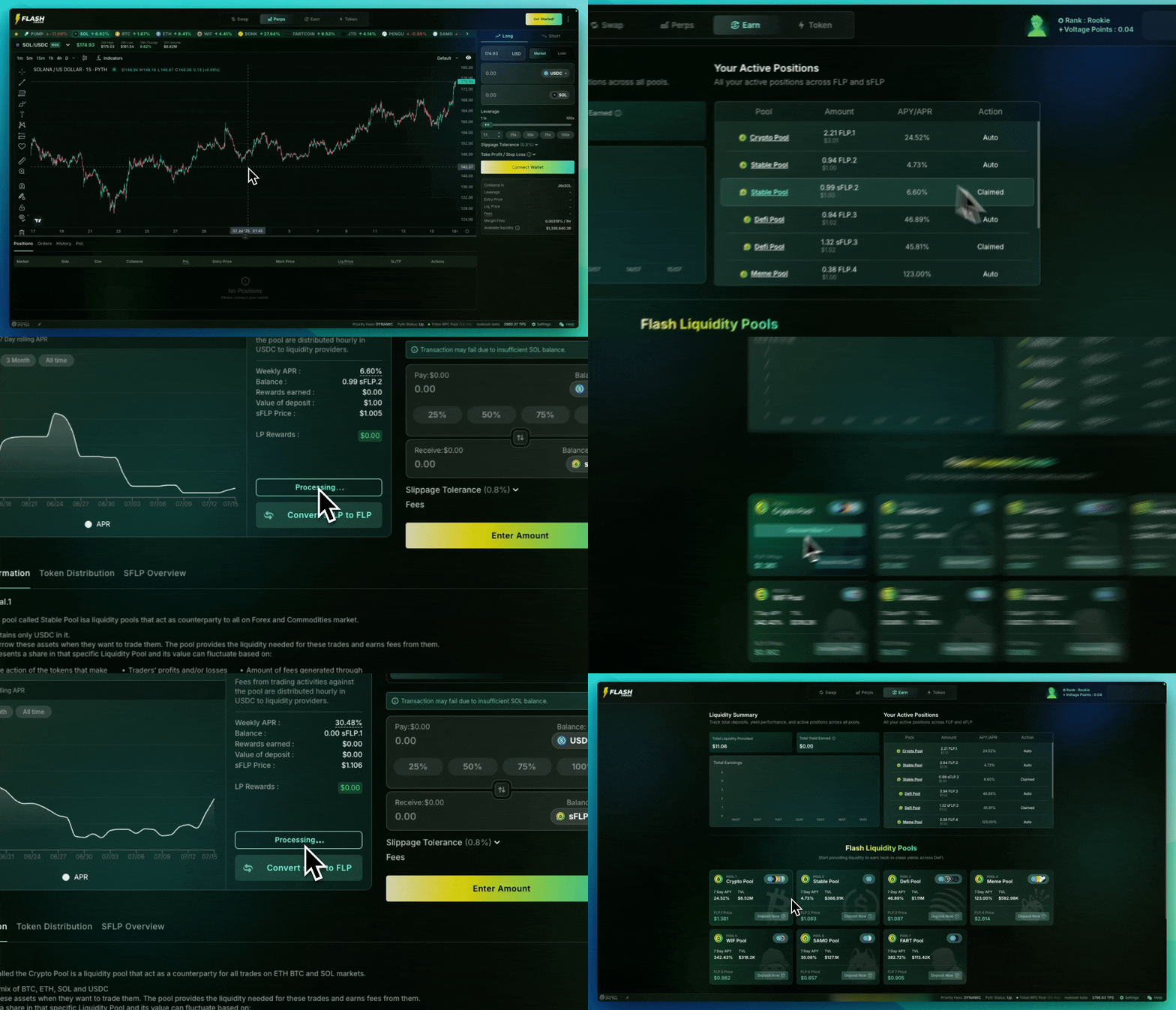
**Two ways to claim.** In the GIF above there are two ways to claim your hourly rewards paid out in USDC for sFLP Pools.
{% endhint %}
#### How to Collect Your Rewards
{% tabs %}
{% tab title="Step 1" %}
**Navigate to the Earn Page**
1. Go to [Flash.Trade](https://www.flash.trade/) and click the **"Earn"** tab.
2. Find your sFLP rewards using either method:
1. **Quick Method:**
* Look for "Your Active Positions" **(desktop)** or "Liquidity Summary" **(mobile)** at the top of the page.
* Click your sFLP pool position — any pool where you hold sFLP.
2. **Pool Cards Method:**
* Find the "Flash Liquidity Pools" section.
* Click **"Deposit Now"** on your pool's card to open the pool page.
{% endtab %}
{% tab title="Step 2" %}
**Check Your Rewards**
In the "Your Position" panel, you can view:
* **LP Rewards**: Your accumulated USDC rewards
* **Weekly APY**: Current rate on your position
* **Staked sFLP / Balance**: Amount of sFLP tokens you hold
* **Pending Activation sFLP**: recently minted sFLP that is not yet active
*Insert screenshot `earn-position-rewards-panel.png` here — the Your Position panel.*
{% endtab %}
{% tab title="Step 3" %}
**Claim Your Rewards**
1. Click the **"Collect Rewards"** button
2. Confirm the transaction in your wallet
3. USDC rewards will be transferred to your wallet
{% endtab %}
{% endtabs %}
#### Prefer auto-compounding instead?
You can switch without burning and re-minting: click **Convert sFLP to FLP** in the same "Your Position" panel and your staked position becomes auto-compounding FLP.
***
{% hint style="info" %}
#### Important Notes
**Reward Schedule**
* Rewards accumulate **hourly** based on trading activity
* Higher trading volume = higher reward distributions
* Rewards are paid in **USDC**
**No Minimum Claim**
* You can collect rewards at any time
* No minimum balance required to claim
* Consider network fees when claiming smaller amounts
{% endhint %}
#### Need Help?
For additional support or questions about using Flash Trade, consult with us on [Discord](https://discord.gg/flashtrade). Remember: legitimate support will never ask for your private keys or recovery phrase.
---
# Agent Instructions
This documentation is published with GitBook. GitBook is the documentation platform designed so that both humans and AI agents can read, navigate, and reason over technical content effectively. Learn more at gitbook.com.
## Querying This Documentation
If you need additional information that is not directly available in this page, you can query the documentation by asking a question.
Perform an HTTP GET request on the following URL with the `ask` and `goal` query parameters:
```
GET https://docs.flash.trade/flash-trade/getting-started/minting-burning-flp/collecting-sflp-usdc-rewards.md?ask=&goal=
```
`ask` is the immediate question: it should be specific, self-contained, and written in natural language.
`goal` is what the user is ultimately trying to achieve, the reason they need the answer. Sharing it helps GitBook give you a better, more relevant answer. A goal is most helpful when it describes the outcome the user wants rather than restating the question. For example, with `ask=how do I create an API token`, a goal like `automate deployments from our CI pipeline` lets GitBook tailor the answer to that use case.
The response will contain a direct answer to the question and relevant excerpts and sources from the documentation.
Use this mechanism when the answer is not explicitly present in the current page, you need clarification or additional context, or you want to retrieve related documentation sections.